I Built a Custom Status Line for Claude Code — And It Changes Everything
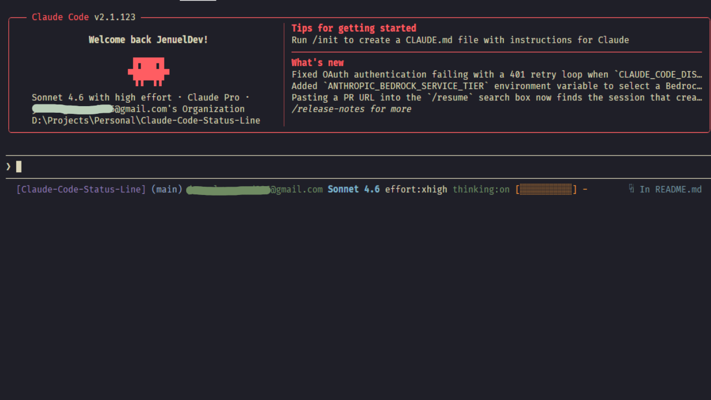
In this blog, I share how I built Claude Code Status Line — a bash script that adds a real-time status bar to your Claude Code terminal, showing your project, git branch, active model, context window usage, and more, all at a glance. I also walk through how to install it in under 30 seconds and how to customize it to fit your workflow.
If you've been using Claude Code in your terminal, you already know how powerful it is. But here's something that bothered me: while you're deep in a session, you have almost no at-a-glance info about what's happening. What model are you on? How full is your context window? Which git branch are you working in? You'd have to dig around to find out.
So I built Claude Code Status Line — a drop-in bash script that gives you a real-time status bar right inside your Claude Code terminal.
Here's what it looks like:
[project] (branch) you@example.com Opus 4.7 (1M context) effort:xhigh thinking:on [████▌░░░░░] 42%Every piece of that is useful. Let me break it down.
What Each Segment Shows You
Segment | What it does |
|---|---|
| The current working directory name |
| Your active git branch |
| Which Claude account you're logged into |
| The active model (e.g. |
| Your reasoning effort level |
| Whether extended thinking is active |
| Context window usage with precision |
That context window bar alone is worth the install — no more guessing when you're about to hit limits.
Installation
Getting it running takes about 30 seconds.
One-liner (macOS / Linux / WSL / Git Bash)
curl -fsSL https://raw.githubusercontent.com/JenuelDev/Claude-Code-Status-Line/main/install.sh | bashThis downloads the script, places it in ~/.claude/, and patches your settings.json automatically. Safe to re-run if anything goes wrong.
Already Inside Claude Code?
Paste this prompt directly into your session and let Claude handle it:
Please install the Claude Code Status Line for me:
1. Download statusline.sh to ~/.claude/statusline.sh and make it executable.
2. Add "statusLine": {"type": "command", "command": "bash ~/.claude/statusline.sh"} to ~/.claude/settings.json.
3. Confirm and remind me to restart Claude Code.
Manual Setup
If you prefer to do it yourself:
curl -fsSL https://raw.githubusercontent.com/JenuelDev/Claude-Code-Status-Line/main/statusline.sh \
  -o ~/.claude/statusline.sh
chmod +x ~/.claude/statusline.sh
Then add to ~/.claude/settings.json:
{
  "statusLine": {
    "type": "command",
    "command": "bash ~/.claude/statusline.sh"
  }
}
Restart Claude Code and you're done.
Platform Support
Platform | Supported? |
|---|---|
macOS | ✅ |
Linux | ✅ |
Windows (WSL) | ✅ |
Windows (Git Bash) | ✅ |
Windows cmd/PowerShell | ❌ (But Powershell Can Run The Bash) |
The only dependencies are jq (optional, falls back to grep) and git (optional, branch segment just hides itself if not in a repo).
Multi-Account Support
If you work with multiple Claude accounts, you can pin a display email:
echo "me@example.com" > ~/.claude/statusline-email
The script also auto-detects multi-profile setups via the active session's transcript path, so the right account info shows up automatically.
Fully Customizable
The whole thing is a single, well-commented shell script. Want to change colors? Edit the ANSI codes. Want to reorder segments? Reorder the lines. Want to drop a segment entirely? Comment it out. No build step, no config format to learn — just bash.
Try It Out
The project is open source and free to use under the MIT license. Check it out and give it a star if it helps you!
👉 github.com/JenuelDev/Claude-Code-Status-Line
Have feedback or want to contribute? Issues and PRs are welcome.
Thanks for reading! If you enjoyed this article and like this kind of content, you're always welcome to buy me a little coffee, but only if you'd like to. No pressure at all, and either way I'm truly grateful you stopped by. ☕
